
Download IACrea – AI‑Powered Interior Design Tool, Free Demo, Secure Updates
Overview: Why IACrea Is Changing the Way We Visualize Spaces
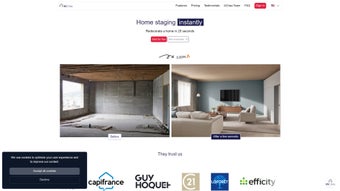
IACrea is an innovative, AI‑driven web application that brings professional‑grade interior design capabilities to anyone with an internet connection. Whether you are a homeowner planning a renovation, a real‑estate agent trying to showcase a property’s potential, or a seasoned designer looking for rapid concept sketches, IACrea offers a streamlined workflow that eliminates the need for expensive render farms or manual drafting. Users simply upload a photo of a room—whether a single‑frame shot or a 360‑degree panorama—and select a design style from a curated palette that includes modern, Scandinavian, industrial, and minimalist aesthetics. Within seconds, the AI engine generates a set of design proposals, applying color schemes, furniture layouts, and decorative elements that align with the chosen style. This instant visual feedback empowers decision‑makers to experiment with multiple looks, compare alternatives, and communicate ideas more effectively to clients or stakeholders.
The platform’s versatility shines in real‑estate contexts, where sellers can illustrate how a vacant space could look fully furnished, or buyers can preview potential upgrades before committing to a purchase. While the core service is free to explore, high‑resolution renders are delivered through credit packages, making the pricing model flexible for occasional hobbyists and heavy‑use professionals alike. IACrea’s web‑based nature means there’s no need for bulky installations; a modern browser on Windows, macOS, Android, or iOS is all that’s required. Security is baked into the service, with encrypted file transfers and GDPR‑compliant data handling, ensuring that user images remain private. In short, IACrea combines the power of artificial intelligence, an intuitive UI, and cross‑platform accessibility into a cost‑effective solution for visualizing interior design concepts.
Beyond basic rendering, IACrea continuously updates its AI models to reflect emerging design trends, seasonal color palettes, and new furniture collections. Users receive these enhancements automatically, eliminating the need for manual patches or version upgrades. The platform also supports collaborative workflows: designers can invite teammates or clients to view and comment on proposals directly within the browser, keeping feedback loops short and organized. With its blend of speed, security, and scalability, IACrea is quickly becoming a go‑to tool for anyone who wants to turn a simple photo into a polished design presentation without hiring a full‑time visualizer.
Key Features & Capabilities That Set IACrea Apart
- AI‑Generated Design Proposals in under 30 seconds per room.
- Multiple Design Styles: Modern, Scandinavian, Industrial, Minimalist.
- Selective Area Redecoration – focus the AI on walls, flooring, or décor zones.
- Virtual Furnishing for empty rooms, complete with 3D‑ready assets.
- Support for 360‑Degree Photos, enabling immersive walkthroughs.
- Credit‑Based Pricing for high‑resolution outputs, with free low‑res previews.
- Integrated Post‑Processing Tools for minor touch‑ups directly in the browser.
- Collaboration Mode – share links with clients for real‑time feedback.
- Secure Cloud Storage for uploaded images, protected by SSL encryption.
- Regular AI Model Updates to reflect emerging design trends.
The heart of IACrea lies in its deep‑learning model trained on millions of interior design photographs and floor plans. This extensive dataset enables the AI to recognize spatial relationships, lighting conditions, and material textures, producing realistic visualizations that often rival hand‑crafted renders. Users can fine‑tune each proposal by adjusting parameters such as color palette intensity, furniture scale, or decorative accents, allowing for a personalized touch beyond the default suggestions. The selective area redecoration feature is particularly useful for targeted renovations—think updating a single accent wall or swapping out a countertop—without re‑generating the entire room layout.
For developers and agencies, the API access (available on higher‑tier plans) facilitates embedding IACrea’s rendering engine into proprietary platforms, expanding its utility across the design ecosystem. The API returns JSON‑structured data that can be programmatically combined with project management tools, allowing seamless integration into existing pipelines. Additionally, the built‑in material cost estimator pulls pricing data from partnered retailers, giving users an immediate sense of budget implications for each design choice.
In addition to visual aesthetics, IACrea offers practical utilities like a built‑in product catalog linking to popular furniture retailers. While these ancillary tools are optional, they provide a holistic design workflow that moves from concept to procurement seamlessly. The platform’s commitment to continuous improvement means new styles, material libraries, and AI enhancements are rolled out automatically, keeping users at the forefront of interior design innovation without the need for manual updates or patches.
Installation, Usage & Compatibility: Getting Started in Minutes
Because IACrea is a web‑based application, there is no traditional “installation” process. To begin, navigate to the official IACrea website using any modern browser (Chrome, Edge, Firefox, Safari). The site automatically detects your operating system and serves an optimized interface for Windows, macOS, Android, or iOS devices. For mobile users, a responsive design ensures touch‑friendly interactions, while desktop users benefit from larger preview windows and drag‑and‑drop file uploads.
Step‑by‑Step Usage Guide:
- Create an Account: Sign up with an email address or single‑sign‑on (Google, Apple) to secure your project history.
- Upload Your Space: Click “Upload Photo,” choose a high‑resolution image of the room, or import a 360° panorama for immersive views.
- Select a Design Style: Choose from the style menu (Modern, Scandinavian, Industrial, Minimalist). You can also combine styles for hybrid looks.
- Generate Proposals: Press “Generate.” The AI processes the image and returns up to three design concepts within 30 seconds.
- Refine & Edit: Use the built‑in editor to adjust colors, swap furniture pieces, or focus on specific zones. Low‑resolution previews are free; high‑resolution exports require credits.
- Export & Share: Download the final image in PNG or JPEG format, or share a view‑only link with clients for feedback.
Compatibility Details (itemprop="operatingSystem"): IACrea runs on any device with a web browser that supports WebGL and HTML5. Tested operating systems include Windows 10/11, macOS Monterey and later, Android 9+ (Chrome), and iOS 13+ (Safari). No additional plugins or extensions are required, and the platform adheres to accessibility standards (WCAG 2.1 AA) for inclusive usage. Users on older browsers may experience slower rendering times, but the core functionality remains intact.
Troubleshooting & Tips: If the AI fails to detect room boundaries, ensure the uploaded photo has good lighting and minimal clutter. Cropping the image to focus on the primary space can improve accuracy. For 360° uploads, use equirectangular JPEG files under 8 MB to avoid upload timeouts. Should you encounter a loading error, clearing the browser cache or switching to a different browser usually resolves the issue.
Pricing & Credits: Upon account creation, users receive a complimentary credit bundle that allows two high‑resolution renders. Additional credits can be purchased in packages ranging from $9.99 for 10 renders to $79.99 for 100 renders. Each credit corresponds to one high‑resolution export, while unlimited low‑resolution previews remain free. All transactions are processed securely via Stripe, with receipts emailed for record‑keeping.
Pros & Cons, FAQ, and Final Thoughts
Pros (itemprop="review" itemscope itemtype="https://schema.org/Review")
- Instant AI‑generated design concepts save time and money.
- Cross‑platform accessibility – works on Windows, macOS, Android, iOS.
- Flexible credit‑based pricing suitable for both hobbyists and professionals.
- Supports 360° photos for immersive virtual staging.
- Secure, encrypted uploads protect user privacy.
- Built‑in cost estimator helps keep projects within budget.
- Collaboration mode streamlines client feedback loops.
Cons
- High‑resolution renders require purchased credits; free version limited to low‑res images.
- AI may occasionally misinterpret complex architectural features.
- Limited offline functionality – requires internet connection.
- Post‑processing may be needed for perfect alignment with brand guidelines.
- Advanced API access is only available on higher‑tier plans.
Frequently Asked Questions (FAQ)
Can I use IACrea for commercial projects?
Yes, IACrea offers commercial licensing options that include bulk credit packages and API access for agencies that need to integrate the tool into their own workflows.
What file formats are supported for uploads?
Common image formats such as JPEG, PNG, and HEIC are supported, as well as 360° equirectangular images in JPEG format.
Is there a free trial available?
New users receive a starter credit bundle that allows two high‑resolution renders at no cost, giving a taste of the premium output quality.
How secure is my uploaded data?
All uploads are encrypted in transit using SSL/TLS, and images are stored on secure, GDPR‑compliant servers. Users can delete their files at any time from the dashboard.
Can I customize the AI‑generated designs?
Absolutely. After the initial generation, you can adjust colors, replace furniture pieces, and fine‑tune lighting using the built‑in editor before exporting.
Does IACrea integrate with other design software?
Through its RESTful API, IACrea can be linked to tools like SketchUp, Revit, or Adobe Photoshop, allowing designers to import AI‑generated renders directly into their existing workflows.
Conclusion & Call to Action
IACrea delivers a compelling blend of AI technology, ease of use, and cross‑device compatibility that makes interior design visualization accessible to anyone—from first‑time home buyers to seasoned architects. While the credit‑based model may introduce an extra step for high‑resolution output, the overall value—especially the rapid turnaround and secure cloud workflow—far outweighs the minor limitations. If you’re looking to experiment with modern, Scandinavian, industrial, or minimalist aesthetics without hiring a designer, IACrea offers a cost‑effective, secure, and instantly rewarding solution.
Ready to transform your rooms with AI‑powered design? Create a free account today, claim your starter credits, and start visualizing your dream space in seconds. For professionals, explore the bulk‑credit plans and API options to integrate IACrea into your client presentations and project pipelines.



.png)



